Go to the field that you need to link to and turn on allow field to be populated dynamically. You will need to give this field a unique name in order to correctly make the links work.
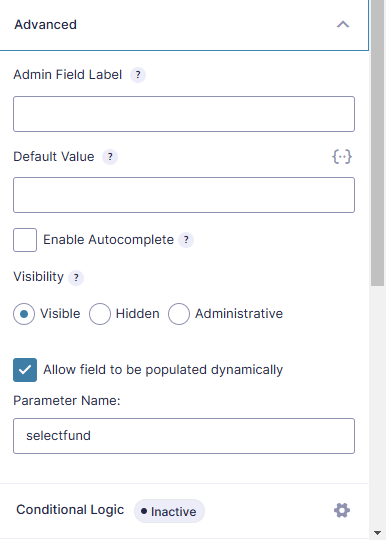
Insert the form into page and then go create your button on another page. Here is an example of the type of link you need to make.
https://createfoundation.com/make-a-donation-form/?selectfund=100%20WOMEN%20WHO%20CARE%20COLUMBUSTo breakdown this example:
- creationfoundation.com/make-a-donation-form/ is the page the form is on
- selectfund is the parameter name given to the field on the form
- 100%20WOMEN%20WHO%20CARE%20COLUMBUS is the format that your individual options need to be in (any spaces need to be replaced by %20)
So a new link would be http://website.com/form-page/?selectthings=THIS%20IS%20A%20OPTION.
What if there are symbols in the titles of my options:
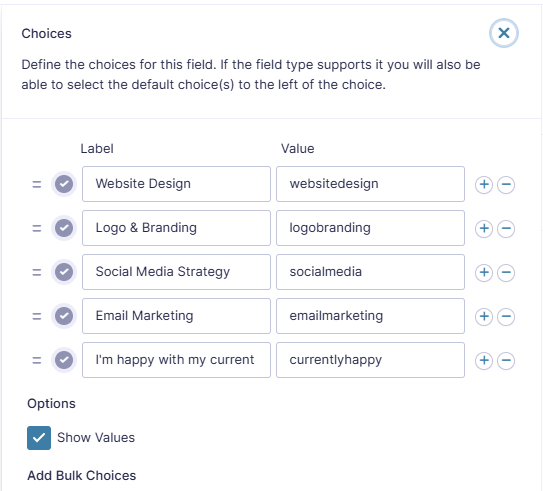
You can also avoid having to use the %20 or other symbols in the URL if you edit the values of the form options. When in the form, checking the show values box at the bottom will add a second column where you can put custom values.
If you need to also have an anchor link on the page:
Your link will follow the following example:
https://vitalitysouth.com/spring-cleaning-for-your-brand-is-it-time-for-a-refresh/?vspoll=currentlyhappy#pollsectionTo breakdown this example:
- vitalitysouth.com/spring-cleaning-for-your-brand-is-it-time-for-a-refresh/ is the page the form is on
- vspoll is the parameter name given to the field on the form
- currentlyhappy is the custom value given to the option in the form
- pollsection is the ID given to the section link
So a new link would be https://website.com/form-page/?selectthings=optiontitle#sectionID