Made with an example using Meg’s WoW characters.
Create two containers/sections. The first container/section is for your filtering system, and the other container/section is for the items being filtered.
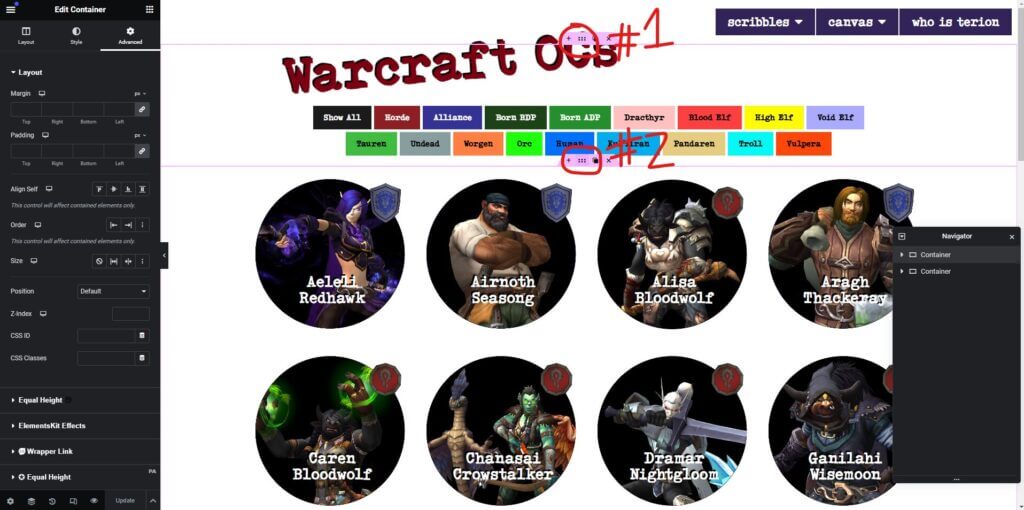
Container/Section #1
In this example, the filters are created using buttons, but theoretically, any item that a CSS class can be applied to could work. Each button will have its own class for what it will filter. For example, the SHOW ALL button in the example filters has a CSS class of filter-button all, the HORDE button has a CSS class of filter-button horde, and the ALLIANCE button has a CSS class of filter-button alliance.
Think of these CSS classes as separate items. So, in the case of filter-button all, item one, which goes on every button, is the filter button, and item two, which controls what the button sorts, is all.

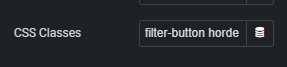

These buttons do not need anything put into the link section. Everything will work through the CSS classes placed on the buttons.
Container/Section #2
For the second section, whatever is being sorted needs to be entirely contained inside this second section. With containers this can be done by stacking containers inside of each other but with sections different widget elements that include everything needed will need to be used. For example, using an icon box or image box element so each item will have a heading, descriptive text, and some kind of icon or image, and the main element can be given a custom width of, say, 25%.
Each container or element inside of this second container will also have CSS classes but these can have multiple CSS classes depending on what they need to be sorted under. From the example, the first row have the following CSS classes: filterable-container alliance bdp all velf, filterable-container alliance adp all ktiran, filterable-container horde bdp all tauren, filterable-container alliance adp all worgen.
- filterable-container marks each as being a element that is filterable
- alliance marks each as an element filtered by the ALLIANCE button
- horde marks each as an element filtered by the HORDE button
- all marks each as an element that will show when the SHOW ALL button is clicked
- each other element in the CSS classes (bdp, adp, velf, ktiran, tauren, worgen) are all tied to their individual buttons
So anything with the filterable-container alliance CSS class on it will be shown when the ALLIANCE button, which has the filter-button alliance CSS filter, is clicked.
Again, consider all of these items on the CSS class as separate items. So item one, which goes on every time you are sorting, is filterable-container, and items two onward control what all buttons the item is sorted under (for example, alliance, adp, all, and worgen are items two, three, four, and five).
The Javascript
This is the script that makes everything function.
jQuery(document).ready(function($) {
    // Set data-filter attribute for All button
    $('.all').attr('data-filter', 'all');

    // Set data-filter attribute for Horde button
    $('.horde').attr('data-filter', 'horde');

    // Set data-filter attribute for Alliance button
    $('.alliance').attr('data-filter', 'alliance');

    // Set data-filter attribute for Born BDP button
    $('.bdp').attr('data-filter', 'bdp');

    // Set data-filter attribute for Born ADP button
    $('.adp').attr('data-filter', 'adp');

    // Set data-filter attribute for Dracthyr button
    $('.dracthyr').attr('data-filter', 'dracthyr');

    // Set data-filter attribute for Blood Elf button
    $('.belf').attr('data-filter', 'belf');

    // Set data-filter attribute for High Elf button
    $('.helf').attr('data-filter', 'helf');

    // Set data-filter attribute for Void Elf button
    $('.velf').attr('data-filter', 'velf');

    // Set data-filter attribute for Tauren button
    $('.tauren').attr('data-filter', 'tauren');

    // Set data-filter attribute for Undead button
    $('.undead').attr('data-filter', 'undead');

    // Set data-filter attribute for Worgen button
    $('.worgen').attr('data-filter', 'worgen');

    // Set data-filter attribute for Orc button
    $('.orc').attr('data-filter', 'orc');

    // Set data-filter attribute for Human button
    $('.human').attr('data-filter', 'human');

    // Set data-filter attribute for Kul'Tiran button
    $('.ktiran').attr('data-filter', 'ktiran');

    // Set data-filter attribute for Pandaren button
    $('.pandaren').attr('data-filter', 'pandaren');

    // Set data-filter attribute for Troll button
    $('.troll').attr('data-filter', 'troll');

    // Set data-filter attribute for Vulpera button
    $('.vulpera').attr('data-filter', 'vulpera');

    // When a filter button is clicked
    $('.filter-button').on('click', function() {
        // Get the category to filter by from the clicked button's data-filter attribute
        var filterValue = $(this).data('filter');

        // Show only items that match the selected category and hide others
        $('.filterable-container').each(function() {
            if ($(this).hasClass(filterValue)) {
                $(this).show();
            } else {
                $(this).hide();
            }
        });
    });
});
The first rows of it correlate with the filter buttons. For example, here is the SHOW ALL button. The all from the filter-button all that was set to the button is what goes into the script here.
    // Set data-filter attribute for All button
    $('.all').attr('data-filter', 'all');
The same applies for the HORDE (filter-button horde), ALLIANCE (filter-button alliance), and all other buttons.
// Set data-filter attribute for Horde button
    $('.horde').attr('data-filter', 'horde');
// Set data-filter attribute for Alliance button
$('.alliance').attr('data-filter', 'alliance');The second half of the code is what makes the communication between the buttons and the filtered items. These can either be left with the same names or changed, they just also need to be changed inside of the code.
The first part of it controls the button. If the buttons are renamed, only the .filter-button needs to be changed. This name corresponds with the first CSS class of the buttons.
The second half of it controls the button. If the containers/elements are renamed, only the .filterable-container needs to be changed.
// When a filter button is clicked
    $('.filter-button').on('click', function() {
        // Get the category to filter by from the clicked button's data-filter attribute
        var filterValue = $(this).data('filter');

        // Show only items that match the selected category and hide others
        $('.filterable-container').each(function() {
            if ($(this).hasClass(filterValue)) {
                $(this).show();
            } else {
                $(this).hide();
            }
        });
    });
});