Windows
Command Prompt
or Windows r
Select cmd from drop down
ipconfig /all
Looking for DNS Servers 192.168.42.251
If the DNS Server is NOT 192.168.42.251
ipconfig /release
ipconfig /renew
ipconfig /all
The DNS Server should show at 192.168.42.251
Now go to File

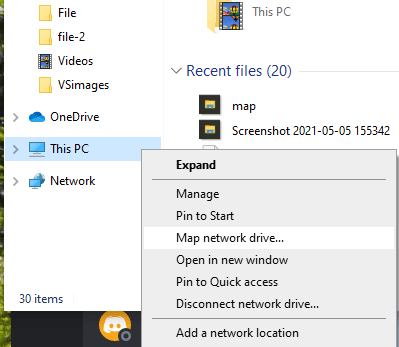
Right Click This Computer
Map network drive
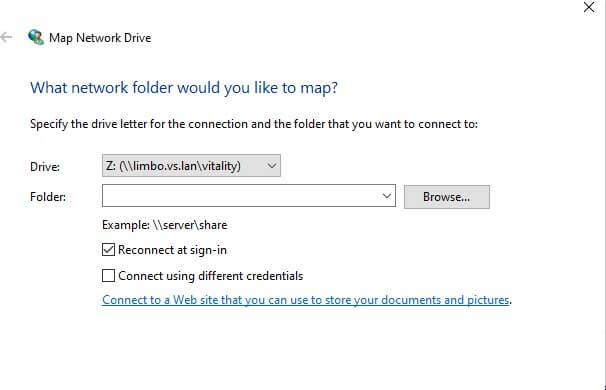
Drive: Select Z
Folder: \\limbo.vs.lan\vitality
user: vsfiles
password: XXX
Enter Username and Password form LastPass
Check Remember My Credentials
Should populate
Apple
Rest DNS Server by Turning the Wifi Off and ON
Open Finder
Connect to Server
smb://limbo.vs.lan/vitality
Select +
Connect
Enter Username and Password form LastPass