Problem
Site giving a 504 Gateway error. Designers were working on the site. The site was not stable. It would be up one moment and down the next.
RUN the command
top
This will show the load on the system.
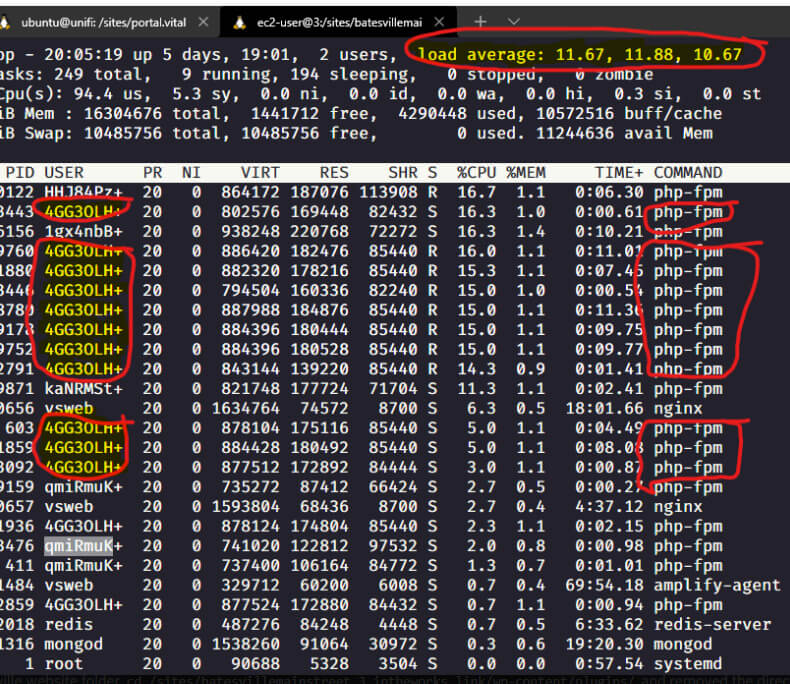
This is the example of what it was like during the problem with the batesville site. The Load Average section in the top right, those numbers should almost never be above 2.0 each. In this example, they are over 10.0 each
One option is to run the command reboot to reboot the server to see if that helps. However, in this case, it was not the operating system issue but due to high load produced from a specific website. Notice the circled and highlighted php processes, a lot of them all from the same user.
It looked suspicious that the user 4GG3OLH had so many PHP processes running (WordPress is run by PHP).
To see which site 4GG3OLH is associated with, do ls -l /sites and you’ll get output showing all of the websites (folder name in far right corner) and user in the 3rd column

That shows 4GG3OLH user is batesvillemainstreet
Next I went in to the batesville website folder cd /sites/batesvillemainstreet.3.intheworks.link/wp-content/plugins/ and removed the directorist plugin. sudo rm -rf /sites/batesvillemainstreet.3.intheworks.link/wp-content/plugins/directorist
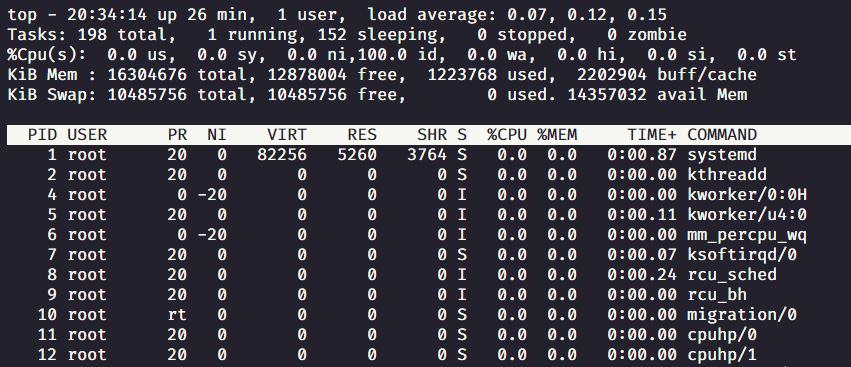
Normally the output from top should look like this
That shows 4GG3OLH user is batesvillemainstreet
Next I went in to the batesville website folder cd /sites/batesvillemainstreet.3.intheworks.link/wp-content/plugins/
and removed the directorist plugin.
sudo rm -rf /sites/batesvillemainstreet.3.intheworks.link/wp-content/plugins/directorist
Normally the output from top should look like this